How The4 turned a Kuwaiti gift retailer's Figma design into a custom homepage, navigation, product page and cart on Kalles 5, for both desktop and mobile, in about a month.
Project snapshot
- Client: Gifts Gate (بوابة الهدايا)
- Industry: Gifts, hospitality sets & flowers
- Country: Kuwait (ships across the Gulf region)
- Live store: gifts-gate.com
- Theme: Kalles 5 (latest version at the time; the store runs Kalles 5.2.1 today)
- Service: Figma to Shopify, custom page development
- Timeline: 5 Dec 2025 – 5 Jan 2026 (handed over and accepted)
- Pages touched: Homepage, menu & footer, product details page, shopping cart (step 1), desktop and mobile
TL;DR
- Gifts Gate arrived with a complete Figma design for its key pages, on desktop and mobile.
- The4 built the homepage, menu and footer, product page and the first cart step on the latest Kalles 5.
- The result is a gift-led storefront with occasion and recipient shortcuts, tabbed product carousels and a clean product and cart flow.
- The client accepted the handover on 5 January 2026, about a month after work began.
About the client
Gifts Gate is a gift retailer based in Farwaniyah, Kuwait. It sells mabkhars (incense burners), hospitality sets, flower arrangements, prayer rugs and occasion gifts, with more than 1,000 products across 85 collections. The store runs in Arabic and English and ships to seven countries in the region.

The brief & challenges
People buy gifts by occasion and by recipient, not just by product type. With more than 1,000 products, Gifts Gate needed a storefront that helps a shopper go from "I need a gift for my mother" to checkout quickly. The challenges:
- Build a finished design faithfully. The Figma file covered the homepage, menu and footer, product details page and cart step 1, each in desktop and mobile versions.
- Stay on a maintainable theme. The brief called for the latest Kalles 5, so the store could keep receiving theme updates rather than running on a fully custom codebase.
- Handle a deep catalogue. Navigation had to surface many categories, occasions and recipient types without overwhelming shoppers.
- Treat mobile as first-class. The mobile design was its own layout, not a squeezed desktop page.
What we did
1. Header, menu and footer
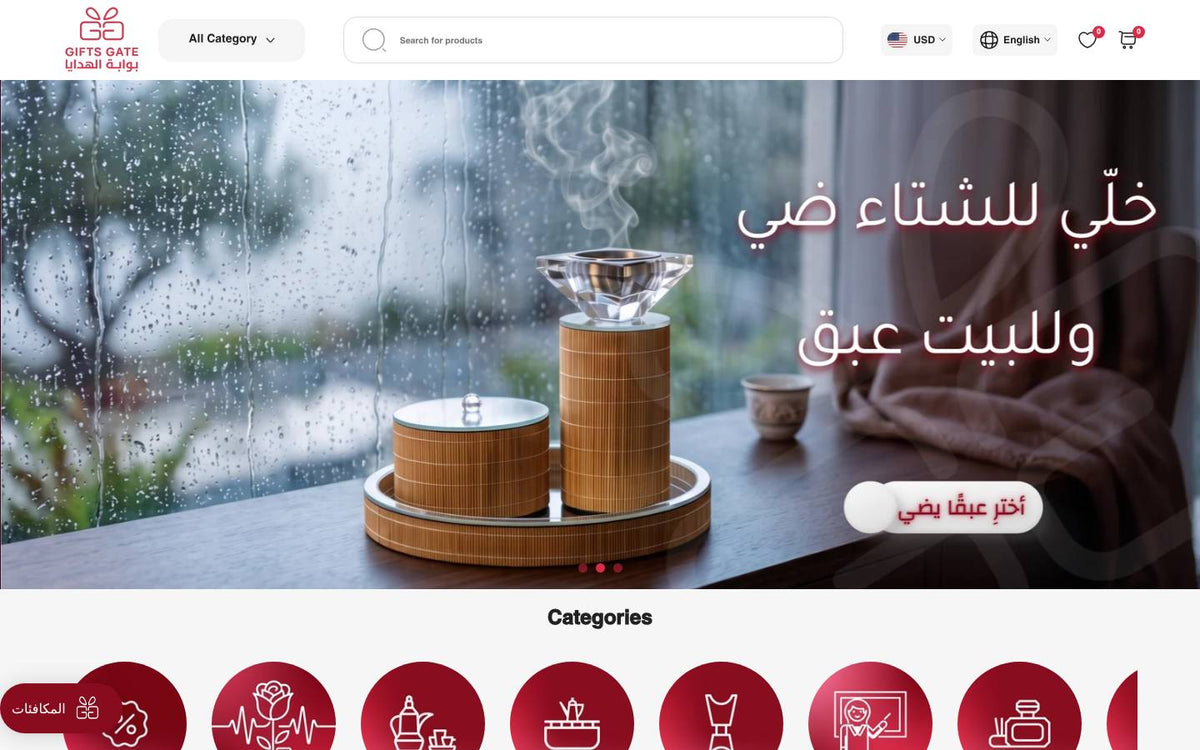
The header combines the logo, an "All Category" menu, a prominent search bar, currency and language selectors, wishlist and cart. The footer groups links into Overview, Join Us (by occasion, category and gift type), Legal and Download App columns on the brand's deep red background.
2. A homepage organised around gifting
Below the hero slideshow, circular category icons lead into tabbed product carousels such as New Arrival, sale and same-day delivery collections. A "perfect gift for the right person" row lets shoppers start from the recipient: wife, husband, mother, father, children, friends and more. The live homepage, which the Gifts Gate team continues to update with seasonal content, also includes a three-step gift finder (occasion, recipient, gift type).


3. A product details page built for gift buyers
The product page keeps the decision simple: vertical thumbnails beside the main image, a clear description, availability and SKU, image-based variant swatches, price, quantity and a single "Add to cart" button, followed by related products.

4. Shopping cart, step 1
The first cart step shows each item with its image, quantity controls and line total, then a short summary with item count, total amount and a bold "Check out" button.

5. Mobile layouts from the mobile design
On mobile, the logo is centred with menu, search and cart icons, categories show as large tappable circles, and a bottom toolbar keeps home, cart, wishlist and account within thumb reach.


Technical notes
- All pages were built on the latest Kalles 5 rather than as stand-alone custom code, so the merchant can manage content through the theme editor.
- Homepage sections are editable, so the store team can refresh tabs and banners for seasons and sales without developer help.
Results
- Four page groups delivered: homepage, menu and footer, product details page and cart step 1, each for desktop and mobile.
- Accepted on 5 January 2026: the client signed off on the handover about one month after the project started on 5 December 2025.
- Still in use: the store runs on Kalles 5.2.1 with more than 1,000 products (observed by The4 in November 2026).
No traffic or conversion figures were supplied for this project.
What this means for your store
- Bring a design, keep a theme. A finished Figma file can be built on a maintained theme like Kalles 5, so you get your design without giving up updates.
- Shop the way people gift. Occasion and recipient shortcuts help shoppers in a large catalogue find something fast.
- Design mobile on purpose. A separate mobile design, built faithfully, gives phone shoppers a layout made for them.
FAQ
Can The4 build my Figma design on a Shopify theme?
Yes. For Gifts Gate, The4 built the client's Figma homepage, menu and footer, product page and cart step 1 on Kalles 5.
Were desktop and mobile built separately?
Both were built from the client's desktop and mobile designs, as part of the same project.
How long did the project take?
About one month, from 5 December 2025 to client acceptance on 5 January 2026.
Can the store team update the homepage after handover?
Yes. The homepage is built from editable theme sections, and today it carries seasonal content such as a November Sale tab.
Have a design ready to build?
The4 turns Figma designs into Shopify stores on Kalles, Ecomus and other themes.