How The4 set up the Vetro theme for a Dubai K-beauty retailer in ten days, with a full-width mega menu, a custom brand index and structured product pages the team could keep building on.
Project snapshot
- Client: Crescite Beauty
- Industry: Beauty & skincare (Korean and Japanese beauty)
- Country: United Arab Emirates
- Live store: crescitebeauty.com
- Theme & version: Vetro (3.0.0 on the live store)
- Service: Store setup on built-in theme features, plus one custom layout
- Timeline: 4 Mar – 14 Mar 2026
- Pages touched: Header, footer, mega menu, homepage, collection page, brand page, product page
TL;DR
- Crescite Beauty wanted a focused, budget-conscious Vetro setup, not custom development, that its own team could build on.
- The4 configured the header, footer, full-width mega menu, homepage, collection and product layouts using Vetro's built-in sections, and applied the brand's colours, typography and spacing.
- The one exception was a brand layout that Vetro does not include, which The4's developers built as a custom section.
- Work was handed over in stages from 9 March and completed on 14 March 2026.
About the client
Crescite Beauty is a Dubai-based online retailer of authentic Korean and Japanese skincare, haircare, makeup and body care. It delivers across the UAE, including same-day delivery in parts of Dubai, and positions itself as an authorised seller sourcing from brands and verified distributors.
The brief & challenges
The client was clear about scope. The goal was not advanced features such as delivery countdowns, loyalty programmes or B2B systems, since those could come later through apps. The goal was a clean, well-planned Vetro setup that the team could take over and build on themselves. The requests were:
- A clean mega menu organised by Shop, Brands and Skin Concerns.
- A minimal, premium look through typography and spacing adjustments.
- A well-structured product page with sensible section order, structured details and colour variants that show the right image.
- Multi-currency for GCC markets through Shopify Markets.
- A basic homepage structure aligned with modern beauty e-commerce sites.
The challenge was getting as close to a premium beauty storefront as possible using only the theme's built-in sections, and being honest about where the theme could not go.
What we did
1. A full-width mega menu built from Vetro's menu blocks
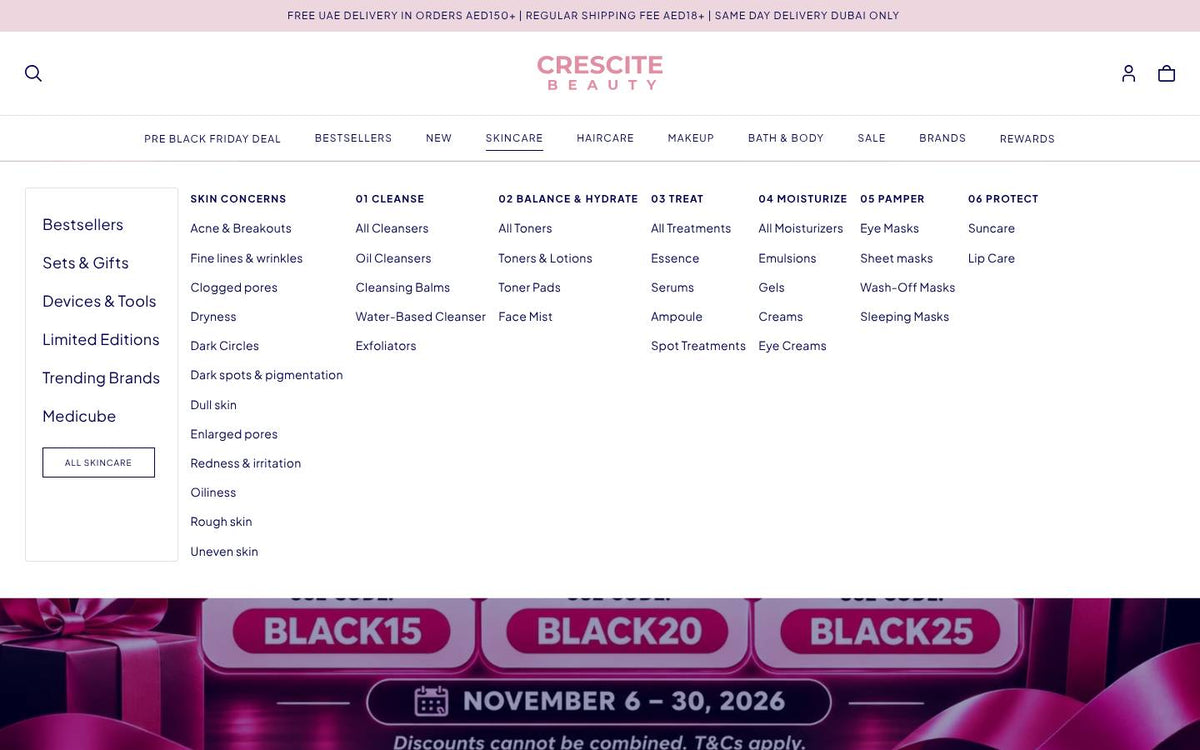
The client shared the menu hierarchy in a document, and The4 built it with Vetro's native mega menu blocks. After the first review, the client asked for every mega menu to run full width. The Skincare menu now shows a featured links column, a Skin Concerns column and a numbered routine (Cleanse, Balance & Hydrate, Treat, Moisturize, Pamper, Protect).

2. Header, footer and a homepage from built-in sections
The homepage was assembled from Vetro's built-in sections and the store's existing content. Brand colours, typography and spacing were applied throughout, and the layout was checked on all devices. When the client asked for a white main header, The4 made the change. When the client asked for a rounded-corner banner slider, The4 explained that Vetro's slider could not do this without custom code.

3. A custom brand layout
Brands are a main way to shop K-beauty, but Vetro does not include a brand layout. This was the one place where The4's developers wrote a custom layout for the client. It was handed over on 10 March. The live All Brands page shows top brands as round image tiles and an A–Z index of every brand.

4. Collection pages with Vetro's filtering
Collection pages follow Vetro's default layout and filtering logic, with a coloured collection banner and a filter sidebar for product type, skin type and brand. The collection layout was handed over on 10 March.

5. Structured product pages and colour swatches
Product pages use Vetro's structure in a clear order: brand, title, price, payment options, variant picker, quantity and buttons. Below these come the description and expandable tabs for ingredients, how to use, shipping, authenticity and returns. The page was configured so that choosing a colour variant shows the matching image. When The4 handed over the swatch images on 12 March, the team explained that a product's swatches only work fully once the product is assigned to a Shopify category that supports a Color option.


Mobile experience
On mobile, the full menu opens in a drawer with a currency selector, and a bottom bar keeps Home, Shop, Search, Account and Cart in reach.

Technical notes
- Built-in first. Apart from the brand layout, everything uses Vetro's own sections and settings, so the team can edit it in the theme editor without code.
- Swatches depend on product data. Shopify's colour swatches read from product category and option settings, so swatch quality depends on how each product is set up.
- Multi-currency. GCC multi-currency through Shopify Markets was part of the agreed scope. Currency settings stay under the merchant's control in Shopify Markets, so what the live store shows today reflects the client's current configuration.
Results
- Delivered in stages: homepage, header, footer and mega menu on 9 March; collection and brand layouts on 10 March; product swatch images on 12 March; final handover on 14 March 2026.
- Ten days from start (4 March) to completion (14 March 2026).
- Brief followed: no unnecessary custom code. The only custom build filled a real gap in the theme.
- Foundation in use: the live store still runs on Vetro, now version 3.0.0 (observed on the live site by The4).
No traffic, conversion or sales figures were supplied for this project.
What this means for your store
- A focused setup can go a long way. A premium theme configured properly often covers most of what a growing brand needs at launch.
- Know where the theme stops. Be clear about what is native, what needs an app and what needs custom code, as with the brand layout and the slider here.
- Clean product data pays off. Features like colour swatches depend on how products are categorised, not just on the theme.
FAQ
Can Vetro show a full-width mega menu?
Yes. Crescite Beauty's mega menus run full width and are built from Vetro's native menu blocks.
Does Vetro have a brand page layout?
Not out of the box. On this project, The4 built a custom brand layout for the client.
Why are some colour swatches not showing images?
On this project, full swatch support depended on assigning products to a Shopify category that supports a Color option.
How long does a focused Vetro setup take?
This one took ten days, from 4 to 14 March 2026, with staged handovers along the way.
Want your theme set up properly from day one?
The4 configures Vetro, Kalles and Ecomus stores around your catalogue and brand.